
I loved one thing about building with Lovable more than anything else. I could talk to my project.
I could describe what I wanted, let AI look at the actual application, make the change, test it and keep going. After working that way, going back to the normal WordPress workflow felt old.
But after building multiple projects with AI builders, I started caring more about something else: control and cost.
I wanted WordPress underneath my projects. I wanted my hosting, my plugins, my database and the ability to move things around without rebuilding the entire project. I also did not want every experiment I built to come with another stream of AI builder and cloud usage costs.
So instead of trying to replace WordPress, I started trying to fix the part of WordPress I missed.
I wanted to turn WordPress into the kind of AI website builder I actually wanted to use.
That is what led me to build Marketur MCP.
The part of Lovable I wanted inside WordPress
Traditional WordPress and AI-first builders have always felt like two completely different workflows.
With WordPress, I might open Elementor, change a container, inspect a plugin, edit PHP, update a setting, clear cache and test the frontend.
With Lovable, I could just explain what I wanted.
That difference is huge.
I still think Lovable is one of the coolest tools I have used for getting an idea working quickly. My issue was never that it could not build good software. It was whether I wanted to keep every project inside that workflow once I started thinking about long-term costs, hosting and control.
I wrote more about that decision in WordPress vs Lovable After Building With Both.
What I really wanted was a third option.
Keep WordPress, but let AI work directly with it.
WordPress is becoming much more AI-agent friendly
This is not just something I made up for MLMPage.
WordPress itself has been moving toward AI-agent workflows through its Abilities API and MCP Adapter. MCP stands for Model Context Protocol. The basic idea is that an AI assistant can discover approved tools and use those tools to interact with another system instead of relying on whatever you manually paste into a chat.
That opens up a very different way to use WordPress.
Instead of ChatGPT only telling you how to change WordPress, you can build a controlled connection that lets it actually work with WordPress.
So I built my own WordPress MCP server
I built a custom connector called Marketur MCP for the way I work on MLMPage.
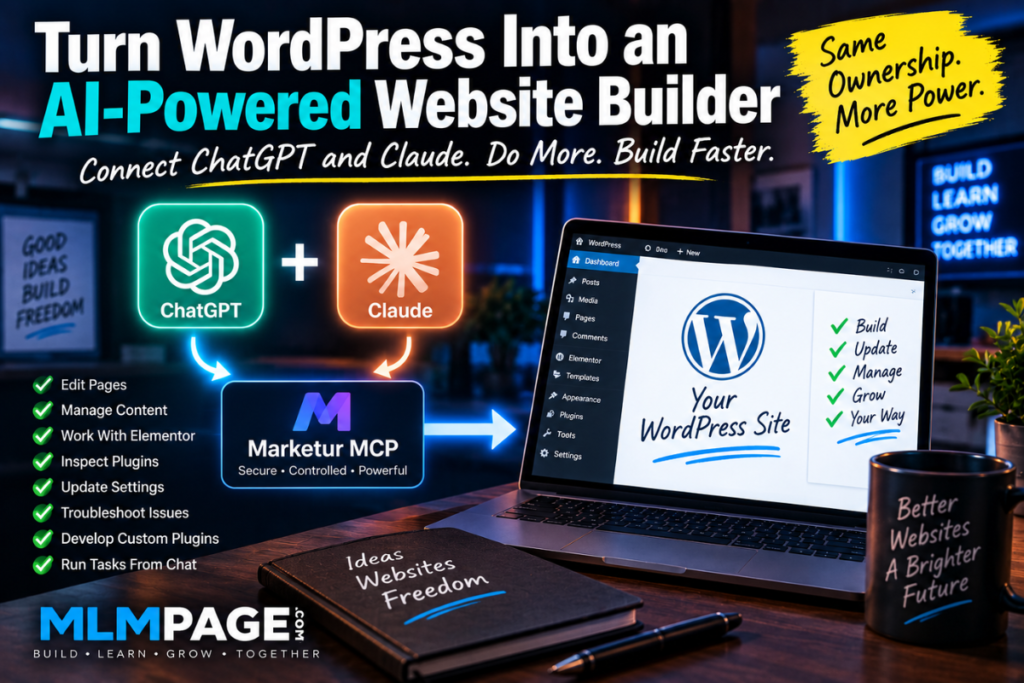
It connects AI assistants such as ChatGPT and Claude to approved parts of my WordPress site.
That means I can open ChatGPT and say something like, “Check the site and see what is going on.”
The AI does not have to guess from a screenshot or wait for me to copy a setting into the conversation. It can use the tools I have allowed to inspect the actual site.
That is the part that makes WordPress start feeling a lot more like an AI website builder.
What ChatGPT and Claude can do on my WordPress site
The connector has grown around real things I needed while building MLMPage.
Right now I can give my AI assistants controlled access to things such as:
- WordPress posts and pages
- Categories and tags
- SEO titles and meta descriptions
- Elementor widgets
- Media
- Selected WordPress settings
- Installed plugin information
- Allowlisted custom plugin source files
- Plugin file updates with automatic backups
So if I want to change an article, I can ask for it.
If an Elementor section is wrong, the AI can inspect the individual widget instead of me copying HTML around.
If one of my custom Marketur plugins has a problem, I can let the AI inspect the actual plugin source and help diagnose it.
If I want SEO metadata updated, it can work with the fields on the live WordPress post.
That is completely different from using ChatGPT as a code generator in another tab.
The workflow now feels a lot like Lovable
This is the simple version of what I built:
↓
ChatGPT or Claude
↓
Marketur MCP
↓
Permission and Allowlist Layer
↓
Your WordPress Site
I talk to the AI. The AI discovers the WordPress tools I have made available. It uses the appropriate tool to inspect or change the site. WordPress remains WordPress underneath everything.
For me, that was the missing piece.
I can still open wp-admin whenever I want. I can still use Elementor. I can still edit a plugin manually. I can move hosts. I can access the database. I am not replacing WordPress with AI.
I am putting an AI development layer on top of WordPress.
Why this is cheaper for the way I build
I build a lot of experiments. That is both useful and probably one of my biggest problems.
I have spent thousands of dollars across AI building tools over the last few years. A lot of those projects never made the money back.
When a project is generating revenue, paying for speed can make perfect sense. When you have five experiments sitting around that are not making anything yet, ongoing builder and cloud usage starts feeling different.
WordPress works better for the way I experiment because I can run multiple projects on inexpensive hosting, reuse plugins, build my own plugins and keep the sites running whether or not I pay for an AI builder that month.
I still pay for the AI tools I use. The difference is that the project itself is not dependent on that AI builder remaining the place where the application lives.
I still get the control I like about WordPress
WordPress has plenty of things that drive me crazy.
Themes fight plugins. Plugins fight plugins. Elementor can turn one tiny spacing change into a twenty-minute investigation. I am not pretending WordPress suddenly became perfect.
But I can get to almost everything.
That matters more to me now than it used to.
If I do not like a host, I can move. If a plugin becomes a problem, I can replace it. If I need a custom feature, I can build it. If something breaks, I have access to the files and database.
Adding the AI workflow solved one of the biggest reasons I enjoyed working in Lovable more than WordPress.
The permission layer matters
Giving an AI direct access to a production WordPress site should not mean giving it unrestricted access to everything.
Marketur MCP uses an allowlist approach. I choose what the assistants can read and which actions they can perform.
Readable WordPress options are explicitly selected. Plugin folders can be allowlisted. Write tools can be controlled separately. Plugin source editing can be disabled entirely. When an approved plugin file is changed, the previous version can be backed up first.
I would not expose every WordPress option because plugins can store API keys, passwords and other sensitive information there.
I also would not tell an AI to start rewriting random third-party plugins on a live site.
The goal is not unlimited AI access. The goal is useful access with boundaries.
ChatGPT and Claude can work on the same project
Another thing I like about this setup is that WordPress becomes the shared project instead of the AI conversation becoming the project.
I can have Claude work through one problem and then ask ChatGPT to inspect the live result. I can use ChatGPT while I am away from the computer and come back later to work through something bigger with Claude.
Both assistants can work with the same WordPress installation through the tools I have approved.
That starts feeling much closer to having AI developers working alongside me than having a chatbot that spits out code snippets.
This is bigger than just my custom setup
WordPress is clearly moving in this direction too. The official WordPress MCP work connects WordPress capabilities to external AI agents, and WordPress.com now supports MCP access for assistants such as ChatGPT and Claude.
That tells me the basic idea is not going away.
The interesting question is how much of the WordPress workflow we eventually move from clicking around dashboards to simply telling an AI what we want done.
For me, that transition has already started.
How I turned WordPress into my version of Lovable
If I had to explain the whole thing in one sentence, it would be this:
I kept WordPress as the platform and connected an AI agent layer to it through MCP.
I get the part of Lovable I loved, talking to the actual project, while keeping the WordPress ecosystem and control I already know.
It is not literally Lovable running inside WordPress. They are completely different platforms.
But from my side of the screen, the workflow finally feels much closer.
That is why I switched back.
Why this matters for an MLM WordPress site
MLM websites can become complicated quickly. Membership levels, affiliate structures, compensation settings, member pages, SEO, community features and custom plugins can all live inside the same WordPress installation.
That is why I built this workflow while working on MLMPage. It lets me use ChatGPT or Claude to inspect and manage approved parts of the actual MLM WordPress site instead of constantly copying settings and code between screens.
Marketur MCP itself is now available through Marketur.net for the broader WordPress market. Here on MLMPage, I focus on how tools like this can help people build and operate MLM websites.
If you are building an MLM site with Ultimate Membership Pro and Ultimate Affiliate Pro, start with the MLM website plugins guide.
If you want the technical connection walkthrough used on MLMPage, read How to Connect WordPress to ChatGPT and Claude Using MCP.